Class PerformanceNavigationTiming
- Namespace
- CSharpToJavaScript.APIs.JS
- Assembly
- CSharpToJavaScript.dll
The PerformanceNavigationTiming interface provides methods and properties to store and retrieve metrics regarding the browser's document navigation events. For example, this interface can be used to determine how much time it takes to load or unload a document.
[Value("PerformanceNavigationTiming")]
public class PerformanceNavigationTiming : PerformanceResourceTiming- Inheritance
-
PerformanceNavigationTiming
- Inherited Members
Remarks
Only the current document is included in the performance timeline, so there is only one PerformanceNavigationTiming object in the performance timeline. It inherits all of the properties and methods of PerformanceResourceTiming and PerformanceEntry.
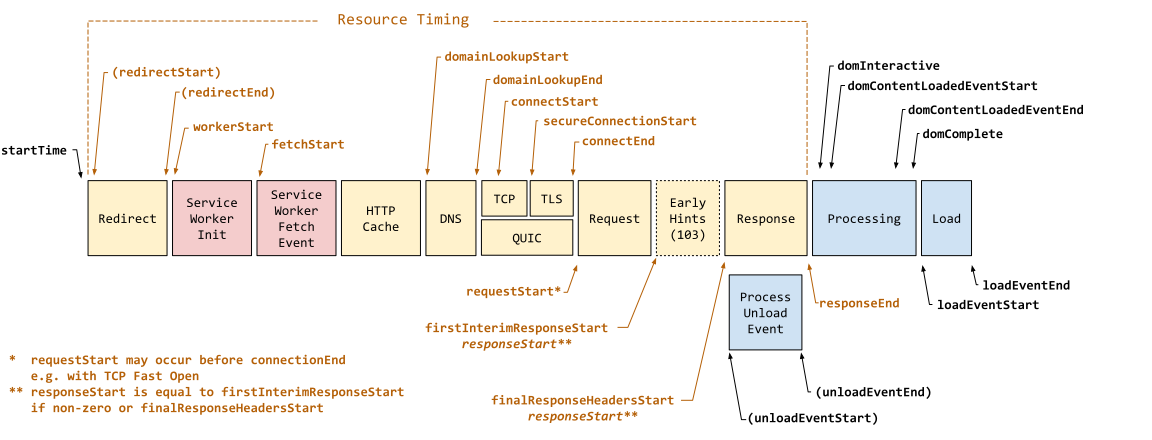
The following diagram shows all of the timestamp properties defined in PerformanceNavigationTiming.
Constructors
PerformanceNavigationTiming()
public PerformanceNavigationTiming()Properties
ActivationStart
NOTE
ExperimentalactivationStart read-only property represents the time between when a document starts prerendering and when it is activated.
[Value("activationStart")]
public Number ActivationStart { get; }
Property Value
- Number
A Number representing the duration between document prerendering start and activation in milliseconds.The value is
0if the page has not prerendered or is still prerendering.
Remarks
CriticalCHRestart
NOTE
ExperimentalCritical-CH HTTP response header could have been, but wasn't, included in the HTTP request initially sent. If the browser does not support that client hint, it is ignored and no connection restart occurs.
[Value("criticalCHRestart")]
public Number CriticalCHRestart { get; }
Property Value
- Number
A Number representing the number of milliseconds elapsed since StartTime when the connection restart occurred in milliseconds.If the value is
0the connection was not restarted.
Remarks
The criticalCHRestart read-only property represents the time at which the connection restart occurred.
-Client hints
-User-Agent Client Hints API
-Improving user privacy and developer experience with User-Agent Client Hints (developer.chrome.com)
-Accept-CH
-Critical-CH
DomComplete
The domComplete read-only property returns a Number representing the time immediately before the user agent sets the document's readyState to "complete".
[Value("domComplete")]
public Number DomComplete { get; }
Property Value
- Number
A Number representing the time immediately before the user agent sets the document's
readyStateto"complete".
Remarks
See also the complete state of ReadyState which corresponds to this property and refers to the state in which the document and all sub-resources have finished loading. The state also indicates that the Windowload event is about to fire.
DomContentLoadedEventEnd
The domContentLoadedEventEnd read-only property returns a Number representing the time immediately after the current document's DOMContentLoaded event handler completes.
[Value("domContentLoadedEventEnd")]
public Number DomContentLoadedEventEnd { get; }
Property Value
- Number
A Number representing the time immediately after the current document's
DOMContentLoadedevent handler completes.
Remarks
Typically frameworks and libraries wait for the DOMContentLoaded event before starting to run their code. We can use the domContentLoadedEventEnd and the domContentLoadedEventStart properties to calculate how long this takes to run.
DomContentLoadedEventStart
The domContentLoadedEventStart read-only property returns a Number representing the time immediately before the current document's DOMContentLoaded event handler starts.
[Value("domContentLoadedEventStart")]
public Number DomContentLoadedEventStart { get; }
Property Value
- Number
A Number representing the time immediately before the current document's
DOMContentLoadedevent handler starts.
Remarks
Typically frameworks and libraries wait for the DOMContentLoaded event before starting to run their code. We can use the domContentLoadedEventStart and the domContentLoadedEventEnd properties to calculate how long this takes to run.
DomInteractive
The domInteractive read-only property returns a Number representing the time immediately before the user agent sets the document's readyState to "interactive".
[Value("domInteractive")]
public Number DomInteractive { get; }
Property Value
- Number
A Number representing the time immediately before the user agent sets the document's
readyStateto"interactive".
Remarks
NOTE
This property is not Time to interactive (TTI). This property refers to the time when DOM construction is finished and interaction to it from JavaScript is possible. See also the
interactivestate of ReadyState which corresponds to this property.
Measuring DOM processing time may not be consequential unless your site has a very large HTML source to a construct a Document Object Model from.
If there is no parser-blocking JavaScript then the DOMContentLoaded event (see domContentLoadedEventStart for the timestamp) will fire immediately after domInteractive.
LoadEventEnd
The loadEventEnd read-only property returns a Number representing the time immediately after the current document's load event handler completes.
[Value("loadEventEnd")]
public Number LoadEventEnd { get; }
Property Value
- Number
A Number representing the time immediately after the current document's
loadevent handler completes.
Remarks
-load event
LoadEventStart
The loadEventStart read-only property returns a Number representing the time immediately before the current document's load event handler starts.
[Value("loadEventStart")]
public Number LoadEventStart { get; }
Property Value
- Number
A Number representing the time immediately before the current document's
loadevent handler starts.
Remarks
-load event
NotRestoredReasons
NOTE
ExperimentalnotRestoredReasons read-only property of the PerformanceNavigationTiming interface returns a NotRestoredReasons object providing report data on reasons why the current document was blocked from using the back/forward cache ({{Glossary("bfcache")}}) on navigation.
[Value("notRestoredReasons")]
public NotRestoredReasons? NotRestoredReasons { get; }
Property Value
- NotRestoredReasons
When the associated
PerformanceNavigationTimingobject represents a history navigation,notRestoredReasonsreturns a NotRestoredReasons object.When thePerformanceNavigationTimingobject does not represent a history navigation,notRestoredReasonswill returnnull. This is useful for determining whether bfcache is not relevant to a particular navigation (as opposed tonotRestoredReasonsnot being supported, in which case it would returnundefined).NOTE
notRestoredReasonsmay returnnulldespite the navigation type being reported as a back/forward navigation. These circumstances include duplicating a back/forward navigation in a new tab and restoring a back/forward navigation tab after a browser restart. In such cases, some browsers copy the navigation type from the original tab, but as these are not actually back/forward navigations,notRestoredReasonsreturnsnull.
Remarks
RedirectCount
The redirectCount read-only property returns a number representing the number of redirects since the last non-redirect navigation in the current browsing context.
[Value("redirectCount")]
public ushort RedirectCount { get; }
Property Value
- ushort
The
redirectCountproperty can have the following values:
Remarks
The higher the number of redirects on a page, the longer the page load time. To improve the performance of your web page, avoid multiple redirects.
The RedirectStart and RedirectEnd properties can be used to measure redirection time. Note that they will return 0 for cross-origin redirects.
Note that client side redirects, such as <meta http-equiv="refresh" content="0; url=https://example.com/"> are not considered here.
Type
The type read-only property returns the type of navigation.
[Value("type")]
public NavigationTimingType Type { get; }
Property Value
- NavigationTimingType
The
typeproperty can have the following values:
Remarks
You can use this property to categorize your navigation timing data as each of these types will have different performance characteristics. Users going back and forth might experience a faster site than users performing navigation for the first time or submitting forms, etc.
For example, if your site provides new content frequently, you might want to refresh that content using Fetch or similar and avoid users having to hit reload for the entire page all the time. The "reload" type can help you find pages that are reloaded frequently.
UnloadEventEnd
The unloadEventEnd read-only property returns a Number representing the time immediately after the previous document's unload event handler completes.
[Value("unloadEventEnd")]
public Number UnloadEventEnd { get; }
Property Value
- Number
The
unloadEventEndproperty can have the following values:
Remarks
-unload event
UnloadEventStart
The unloadEventStart read-only property returns a Number representing the time immediately before the previous document's unload event handler starts.
[Value("unloadEventStart")]
public Number UnloadEventStart { get; }
Property Value
- Number
The
unloadEventStartproperty can have the following values:
Remarks
-unload event
Methods
ToJSON()
The toJSON() method of the PerformanceNavigationTiming interface is a {{Glossary("Serialization","serializer")}}; it returns a JSON representation of the PerformanceNavigationTiming object.
[Value("toJSON")]
public Object ToJSON()
Returns
- Object
A {{jsxref("JSON")}} object that is the serialization of the PerformanceNavigationTiming object.