Note
cstojs-cli 0.1.3 is used.
I assume that the cli installed as a dotnet tool, that way, the cli can be called as "cstojs-cli".
Hello world
First, let's create a folder where the project will be, I called it "HelloWorld_Example". Now, inside that folder, open a terminal and type:
cstojs-cli setup "Output"
The command will create a dotnet project with an "Output" folder as an output for js files.
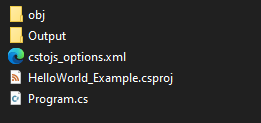
"Output" - folder where js files will be placed.
"cstojs_options.xml" - various options for a csharptojavascript library.
Now before we start "coding" hello world :) let's create an HTML file inside of "Output", I called "index.html"
<!DOCTYPE html>
<html>

<head>
    <title>Hello, world!</title>
    <script src="./Program.js" type="text/javascript"></script>
</head>

<body>
</body>

</html>
Now in the opened terminal type:
cstojs-cli translate
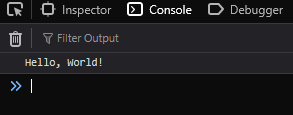
Once translated, open "index.html" and open a console, you should see a message "Hello, World!"
Now, let's code!
Open "Program.cs" in your favorite ide, delete everything, and add this code.
using CSharpToJavaScript.APIs.JS;
using static CSharpToJavaScript.APIs.JS.Ecma.GlobalObject;

GlobalThis.Window.Document.AddEventListener("DOMContentLoaded", (Event e) =>
{
    HTMLElement body = GlobalThis.Window.Document.Body;

    Element paragraph = GlobalThis.Window.Document.CreateElement("p");
    Text helloWorld = GlobalThis.Window.Document.CreateTextNode("Hello, World!");

    paragraph.AppendChild(helloWorld);

    (body as ParentNode).Append(paragraph);
}, true);
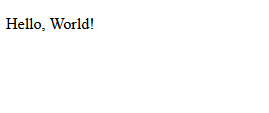
Now, let me explain line by line. In the meantime, you can run cstojs-cli translate and see a "Hello, World!" message on a reloaded "index.html".
- Using static directive, this is needed if you want (you do!) to use ECMA api/web api:
using CSharpToJavaScript.APIs.JS;
using static CSharpToJavaScript.APIs.JS.Ecma.GlobalObject;
- Adding an event listener to make sure the body is loaded before js execution:
GlobalThis.Window.Document.AddEventListener("DOMContentLoaded", (Event e) =>
{
- Keeping reference to the body:
{
    HTMLElement body = GlobalThis.Window.Document.Body;
- This shows how to create an element and textnode, explore other methods in Document:
Element paragraph = GlobalThis.Window.Document.CreateElement("p");
Text helloWorld = GlobalThis.Window.Document.CreateTextNode("Hello, World!");
- AppendChild is easy:
paragraph.AppendChild(helloWorld);
- But what about "Append"??? Well, you need to cast a class object to the "ParentNode" interface before you can use methods like "Append" and "QuerySelector". See all methods ParentNode.
Note
As of CSharpToJavaScript 0.1.7, you can use explicit cast (ParentNode(body)).
    (body as ParentNode).Append(paragraph);
}, true);
Translated js:
globalThis.window.document.addEventListener("DOMContentLoaded", (e) =>
{
    let body = globalThis.window.document.body;

    let paragraph = globalThis.window.document.createElement("p");
    let helloWorld = globalThis.window.document.createTextNode("Hello, World!");

    paragraph.appendChild(helloWorld);

    body.append(paragraph);
}, true);
See the full source code: https://github.com/TiLied/CSTOJS_Pages/tree/main/tutorials/HelloWorld_Example
Live example:
Hello world(Class edition)
You may ask, what about more traditional c#, more classical. You can do that!
- First, create a folder and run:
cstojs-cli setup "js"
Why "js", why not :)
Copy and paste "index.html" to the "js" folder.
Program.cs is almost the same:
using CSharpToJavaScript.APIs.JS;
using static CSharpToJavaScript.APIs.JS.Ecma.GlobalObject;

namespace HelloWorldClass_Example;

public class Program
{
    public static void Main()
    {
        GlobalThis.Window.Document.AddEventListener("DOMContentLoaded", (Event e) =>
        {
            HTMLElement body = GlobalThis.Window.Document.Body;

            Element paragraph = GlobalThis.Window.Document.CreateElement("p");
            Text helloWorld = GlobalThis.Window.Document.CreateTextNode("Hello, World!");

            paragraph.AppendChild(helloWorld);

            (body as ParentNode).Append(paragraph);
        }, true);
    }
}
- Try running
cstojs-cli translateand open "index.html".
- And... nothing. Well, we need to call a static method "Main" somehow. As of 0.1.2, the only way to call it is to modify "cstojs_options.xml". Open "cstojs_options.xml" and change the content to:
<ProjectOptions>
  <Output Folder="js" />
  <File Source="./Program.cs">
    <Option AddSBAtTheBottom="Program.Main();" />
  </File>
</ProjectOptions>
Tip
Rather than modifying cstojs_options.xml you can use static constructor.
- Now, run
cstojs-cli translateagain, and here we go "Hello, World!" is showing. See CSTOJSOptions for more options. They can be applied as a global option or local to the file. In this example, the option applied to the "Program.cs" file only.
Translated js:
class Program
{
    static Main()
    {
        globalThis.window.document.addEventListener("DOMContentLoaded", (e) =>
        {
            let body = globalThis.window.document.body;

            let paragraph = globalThis.window.document.createElement("p");
            let helloWorld = globalThis.window.document.createTextNode("Hello, World!");

            paragraph.appendChild(helloWorld);

            body.append(paragraph);
        }, true);
    }
}
Program.Main();
See the full source code: https://github.com/TiLied/CSTOJS_Pages/tree/main/tutorials/HelloWorldClass_Example
Live example: